Client
Download
Download the latest release of BepInEx for V Rising from the Thunderstore (https://v-rising.thunderstore.io/package/BepInEx/BepInExPack_V_Rising/)
Installation
- Extract the downloaded archive into a folder (NOT THE GAME FOLDER)
- Inside the extracted folder you will find a folder called
BepInExPack_V_Rising. - Open the
BepInExPack_V_Risingfolder in your file explorer. - Copy all of the contents of this folder into your game folder
steamapps/common/VRising/. - Run the game.
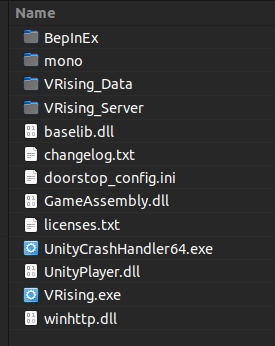
The contents of your games directory should look like this:
Server mods in singleplayer
To run server mods in singleplayer you need the ServerLaunchFix mod. The reason is that even when you're playing singleplayer, the game launches a server for you in the background, and this server will not have the mods you have installed on your client by default. the ServerLaunchFix mod ensures that all mods you have on the client exist on your local server